


Key Takeaways
- Understand scalability testing to predict system performance under growing workloads.
- Differentiate scalability testing from capacity testing to set realistic performance goals.
- Use scalability testing to reveal hidden infrastructure constraints early.
- Model workloads accurately to guide infrastructure and resource planning decisions.
- Select the right scalability testing tools for reliable insights.
When your user base grows, your application faces new challenges. Scalability testing in software testing helps you anticipate these moments clearly and confidently. Instead of guessing if your system can keep pace, you’ll know exactly how it behaves under increasing pressure. In this guide, we’ll cover precisely what scalability testing is, why it matters, and how it fits into broader performance testing strategies. You’ll find practical advice, real-world scenarios, and straightforward steps to conduct effective scalable tests.

What Is Scalability Testing?
Scalability testing is a specialized practice within performance testing that evaluates a system’s ability to handle increasing workloads. It doesn’t simply push software to its limits; rather, scalability testing measures how gracefully your system adapts as more users, data, or transactions flow through it.
A common misconception is treating scalability testing like stress or load testing. Unlike these tests, scalability testing isn’t focused primarily on discovering the system’s maximum capacity or finding specific performance bottlenecks. Instead, the objective here is understanding precisely how well your application or infrastructure accommodates steady and incremental growth.
Learn more: What Is Contract Testing?
For example, scalability testing may involve gradually increasing the number of simultaneous users from several hundred to tens of thousands, tracking how this incremental change affects response times and system stability. It gives clear, measurable insight into whether your system can maintain a consistent quality of service under real-world growth scenarios. Crucially, this allows businesses to anticipate the need for infrastructure upgrades or optimizations long before users experience degraded performance.
Scalability Testing vs Capacity Testing

While both scalability testing and capacity testing relate closely to understanding system performance under various loads, their objectives differ significantly.
Scalability testing explores how well your application adapts to growth. It seeks to answer questions like, “If user demand steadily increases, does the system handle it smoothly and consistently?” In this testing, you’re focused on observing the software’s incremental response to growing workloads.
On the other hand, capacity testing identifies the maximum load a system can handle before performance noticeably degrades. It’s aimed at pinpointing exact thresholds — essentially, determining the point at which your application reaches its performance limits.
Here’s a clear, quick comparison:
| Aspect | Scalability Testing | Capacity Testing |
|---|---|---|
| Primary Goal | Evaluate adaptability to growth | Identify maximum performance limits |
| Test Approach | Gradual load increase | Load until maximum is reached |
| Focus Area | Stable growth | Performance thresholds |
| Outcome | Confidence for future growth | Defined capacity limits |
Key Benefits of Scalability Testing
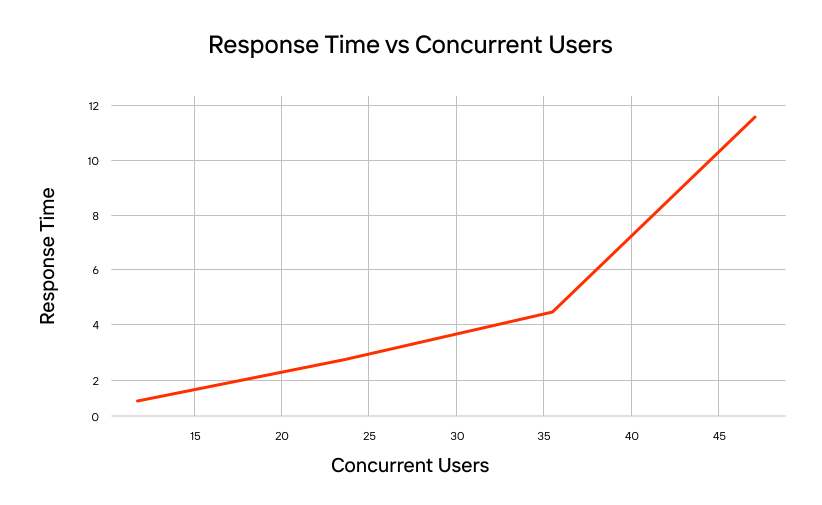
Scalability testing is valuable because it cuts through the guesswork, providing concrete, actionable data on how your system behaves under realistic growth conditions. For performance engineers, this data goes deeper than surface-level insights — it delivers practical advantages directly applicable to daily engineering challenges:
Key Steps of Scalability Testing
Effective scalability testing in performance testing involves a structured process. Each step is critical for capturing reliable data of your system’s real-world scaling behavior:
- Define Performance Metrics Clearly
Before testing begins, select metrics that genuinely reflect user experience, such as response time, throughput, and transaction success rate. Metrics must align with business goals and user expectations to provide meaningful insights. - Identify Scalability Factors
Clearly identify components or resources that significantly impact scalability, such as CPU usage, memory allocation, database connections, network bandwidth, or storage I/O. Explicitly pinpointing these factors ensures the test targets relevant resource constraints accurately. - Create Detailed Workload Models
Instead of generic load profiles, scalability tests demand precisely tailored workload models. For example, in e-commerce, define clear scenarios like “baseline” daily traffic versus intense “Black Friday” peaks. For utilities, outline conditions like “blue sky” (normal operations) and extreme scenarios such as a “mega-storm.” Realistic, scenario-specific workload models are essential to effective scalability testing.
- Prepare a Realistic Test Environment
Ensure your test environment closely mirrors your actual production setup in terms of hardware, software configuration, network architecture, and data volume. Accurate testing environments reduce discrepancies between test outcomes and real-world performance, making test results genuinely reliable. - Conduct Incremental Scaling Tests
Execute tests by gradually increasing the user load from a clearly defined baseline to your planned maximum capacity. For instance, start at 5,000 concurrent users and systematically raise the load to 100,000 over several hours. Gradual scaling allows precise observation of subtle performance degradations, providing early warning signs of potential issues. - Analyze Results and Define Clear SLOs and SLAs
Evaluate collected data against your predefined performance metrics. Clearly established Service Level Objectives (SLOs) and Agreements (SLAs) provide critical benchmarks for this evaluation. Identifying deviations early ensures corrective actions can be implemented calmly and proactively.
Popular Scalability Testing Tools
Selecting a suitable tool greatly influences the quality and depth of your scalability testing results. Each option below has distinctive features, strengths, and limitations clearly relevant to professional engineers:
PFLB

PFLB is a modern, cloud-native platform designed explicitly to handle large-scale scalability testing. It emphasizes clarity and accuracy through advanced automation and analytics:
- AI-Powered Analytics: Version 1.0.11 introduced AI-generated performance reports, significantly cutting manual analysis time and clarifying insights. This feature helps quickly translate raw data into actionable performance improvements.
- Automated Workload Modeling: Automatically integrates real-world user data (e.g., Google Analytics) to design realistic workloads. Ideal for precise scenarios like “baseline” vs. “Black Friday” or “blue sky” vs. “mega-storm.”
- Integrations and Protocols: Offers seamless integration with CI/CD pipelines (Jenkins, GitLab, GitHub Actions) and real-time Grafana dashboards. Supports extensive protocols: HTTP/S, REST API, gRPC, JMS, JDBC, Kafka, MQTT, AMQP.
- Efficiency & Cost Reduction: Independent reviews highlight substantial cost savings (~30%) due to AI-driven optimization and efficient resource allocation.
- User Reviews: Highly rated (4.8–5 stars) for ease-of-use, powerful analytics, and infrastructure optimization. However, smaller teams note pricing and initial onboarding complexity as potential hurdles.
PFLB also offers load and performance testing services.
Apache JMeter

Apache JMeter is an established open-source Java-based tool suitable for load, scalability, and stress testing across multiple protocols:
- Protocol and Plugin Ecosystem: Comprehensive support for HTTP, FTP, JDBC, JMS, and SMTP, complemented by a vast community-driven plugin library enabling extensive customization.
- Advanced Scripting: GUI-driven script creation combined with support for custom scripting provides great flexibility but increases setup complexity for less experienced teams.
- Integration: Integrates with CI/CD pipelines (Jenkins), but typically requires additional setup for cloud distribution or geo-distributed testing.
- Limitations: Its scalability often requires manual infrastructure provisioning, intensive resource management, and considerable manual data analysis, making JMeter best suited to technically skilled teams familiar with its complexity.
Gatling

Gatling, built on Scala and Netty, is optimized for high-performance scalability tests, providing strong scripting and efficient resource utilization:
- Performance & Efficiency: Its asynchronous architecture efficiently handles large user loads with minimal resource consumption, ideal for large-scale tests.
- Polyglot Capability: Recent updates (v3.14, May 2025) introduced JavaScript and TypeScript SDKs alongside Jave SDK or Scala SDK, making scripting more accessible.
- Reporting & Integration: Gatling generates intuitive, detailed HTML reports. Gatling Enterprise further extends real-time dashboards and collaboration tools, integrating smoothly into CI/CD workflows.
- Technical Skill: Gatling requires coding proficiency, mainly in Java, which places it primarily within engineering-driven teams comfortable with code-heavy test automation.
K6

K6 has become popular for its ease-of-use, developer-friendly scripting, and seamless integration into modern development pipelines:
- Cloud-Native & Developer Friendly: Built with JavaScript scripting at its core, K6 was initially created for CI/CD and works effortlessly with Jenkins, GitHub Actions, and Azure DevOps.
- Real-Time Analytics: Native integration with Grafana provides live monitoring and real-time analytics during test execution, simplifying issue identification.
- Distributed Execution: Easy to scale tests across distributed environments, suitable for rapidly growing user scenarios.
- Protocol Limitations: While excellent for modern API-centric architectures (REST APIs, HTTP/S), K6 lacks built-in support for more traditional enterprise protocols (e.g., JMS, JDBC), potentially requiring additional customization.
Locust

Locust is a lightweight Python-based scalability testing tool highly praised for simplicity, flexibility, and user-friendly scenario scripting:
- Easy Python Scripting: Scenarios are written using plain Python, enabling quick, clear definition of user behaviors without extensive coding.
- Real-Time Monitoring: Built-in web-based dashboards provide real-time insight into testing progress, enabling immediate performance visibility.
- Distributed Load Generation: Supports easy distributed test execution across multiple worker nodes, allowing simulation of millions of concurrent users.
- CI/CD Friendly: Integrates neatly into pipelines like Jenkins, Travis CI, and GitHub Actions for automated testing workflows.
- Limitations: Focuses mainly on HTTP and RESTful APIs; advanced protocol support (JMS, JDBC, Kafka, gRPC) typically requires manual extension or additional modules.
Final Thoughts
Scalability testing is crucial for ensuring optimal performance as demand increases. By clearly understanding its purpose, differentiating it from similar tests and applying structured workload models, engineering teams can identify issues and align infrastructure investments with actual business needs.
Choosing the right tool significantly influences the depth, accuracy, and practicality of your scalability insights. Among current platforms, PFLB stands out by delivering AI-driven analytics, automated workload modeling, and streamlined integrations, offering engineers deeper and more detailed insights from every scalability test conducted.
Ultimately, thorough scalability testing ensures you’re not guessing how your system scales — you’re actively shaping its ability to meet real-world demands.