

Modern applications rely heavily on APIs (Application Programming Interfaces) to communicate and exchange data across different systems. At the heart of this interaction lies the API endpoint — a fundamental concept that defines where and how data exchanges happen. This guide explains clearly what an API endpoint is, outlines its importance, and provides practical insights into designing effective and reliable endpoints.
What Is An API Endpoint?
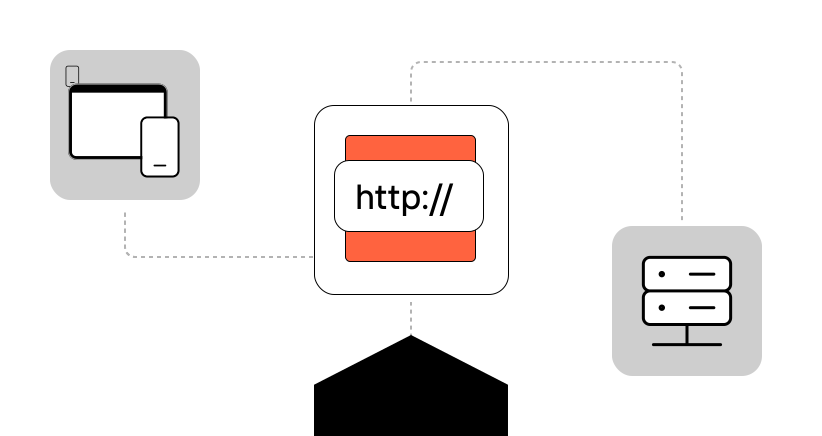
An API endpoint is a specific digital location, typically represented as a URL, where an API can be accessed and interacts with software applications. It serves as the interface through which clients communicate with servers, requesting data or triggering actions.
Each endpoint in API architecture is designed to handle a specific task. For instance, a blogging platform might have distinct API endpoints for managing posts (/posts), authors (/authors), or comments (/comments). When developers talk about an API endpoint URL, they refer to the complete web address — such as https://example.com/api/posts — used to send requests and receive responses.
To illustrate with a practical API endpoint example, consider a weather app. It might interact with an endpoint such as:
GET https://api.weather.com/v3/weather/forecast/dailyHere, the endpoint in API specifies exactly which resource the app intends to retrieve—in this case, daily weather forecasts.
The primary purpose of API endpoints is to facilitate clear, structured interactions between systems, enabling consistent data exchanges and simplifying software integration.
Why Are API Endpoints Important?
To understand what is endpoint in API design, let’s have a look at why these endpoints matter in first place:
- Standardization and Clarity: Clearly structured API endpoints enable developers to intuitively interact with APIs. They provide consistency, simplifying development and reducing integration errors.
- Enhanced Integration: Properly organized endpoints allow seamless interoperability between different applications and services, enabling smooth communication even across diverse technology stacks.
- Improved Security: API endpoints can enforce authentication and authorization measures effectively, controlling who can access sensitive data or perform critical actions, thereby minimizing vulnerabilities.
- Maintainability: Clearly defined endpoints simplify updates, documentation, and versioning, making it easier for developers to introduce changes without disrupting existing integrations.
- Scalability and Flexibility: Well-structured API endpoints allow applications to scale effortlessly. They enable the addition of new resources, actions, or data types without compromising the existing architecture.
In short, API endpoints ensure efficient, secure, and scalable interactions between applications and their components.
How Do API Endpoints Work?
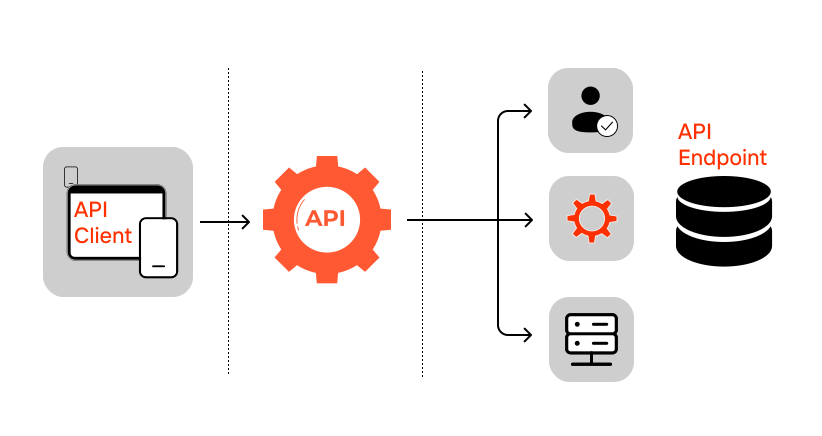
To fully understand how do API endpoints work, let’s explore the technical details behind the scenes. Each interaction with an API endpoint involves multiple steps and several technical components that work together to fulfill requests and deliver responses:
Client Initiates a Request
The process begins when a client — such as a web application, mobile app, or IoT device — sends an HTTP request to an API endpoint URL. This request includes specific components that instruct the API precisely how to handle it:
- HTTP Method: Defines the operation type:
GET: Retrieve data.POST: Create new data entries.PUT: Fully replace an existing resourcePATCH: Partially update existing data.DELETE: Remove resources.
- URL Path and Parameters: The URL typically includes a resource path, such as:
- nginx
GET https://api.example.com/users/123This example targets the resource /users, requesting details for user ID 123.
- Headers: HTTP headers provide additional context:
Authorization: Bearer tokens, API keys, or OAuth credentials for secure access.Content-Type: Specifies the format of request payload, such as application/json.Accept: Indicates acceptable response formats, typically JSON or XML.
- Request Body (optional): Relevant for methods like
POST,PUT, orPATCH, containing data sent by the client to create or update resources.
Example of a POST request with JSON body:
http
POST https://api.example.com/users
Content-Type: application/json
Authorization: Bearer eyJhbGciOiJIUzI1...

{
  "name": "John Doe",
  "email": "john@example.com"
}
Endpoint Receives and Parses the Request
When the API receives the HTTP request at the specified endpoint in API, the server evaluates:
- Routing: Determines which function or method should handle the request based on the URL and HTTP method.
- Parsing: Extracts and interprets parameters, headers, and request body data.
Authentication and Authorization
Secure APIs enforce authentication and authorization mechanisms:
- Authentication verifies client identity, typically using:
- API Keys
- OAuth tokens (Bearer tokens)
- JSON Web Tokens (JWT)
- Authorization checks whether the authenticated client has permissions to access or modify the requested resource.
Example Authorization header:
h
Authorization: Bearer eyJhbGciOiJIUzI1NiIsIn...Request Processing and Business Logic Execution
The API endpoint logic executes actions corresponding to the request type and parameters:
- Database operations (CRUD: Create, Read, Update, Delete)
- Data validation, sanitization, and transformation
- Calling external services or additional APIs
- Complex application-specific business logic execution
For instance
A GET request might retrieve records from a database, apply filtering or sorting, and format data accordingly. A POST request may validate data, check database constraints, and insert new entries.
Response Generation
Upon completing the requested operations, the endpoint prepares a structured response:
- Status Code: Indicates outcome of the request. Below you’ll find the most common ones:
200 OK: Successful request204: No content201 Created: New resource created400 Bad Request: Client-side errors (e.g., validation issues)401 Unauthorized: Authentication failure403 Forbidden: Insufficient permissions404 Not Found: Nonexistent resources500 Internal Server Error: Server-side issues
- Response Body: Data payload formatted as JSON or XML, including requested data or error details.
Example successful JSON response:
json
HTTP/1.1 200 OK
Content-Type: application/json

{
  "id": 123,
  "name": "John Doe",
  "email": "john@example.com",
  "createdAt": "2025-06-17T08:30:00Z"
}
Client Receives and Handles Response
Finally, the client receives the response. It then:
- Parses and interprets the response data.
- Updates user interfaces accordingly.
- Handles errors or exceptions gracefully by informing users or retrying operations as necessary.
Caching and Optimization (Optional)
Advanced implementations use caching layers like Redis or CDNs (Content Delivery Networks) to optimize API response times, especially for frequently requested data. Clients or intermediaries (proxies) may cache responses for improved efficiency.
What Is the Difference Between a REST Endpoint and a GraphQL Endpoint?
When designing APIs, developers typically choose between REST and GraphQL endpoints. Here are their core differences:
| Parameter | REST Endpoint | GraphQL Endpoint |
|---|---|---|
| Schema Definition | No strict schema enforced; endpoints predefined and resource-based | Strongly-typed schema; explicitly defined by types and relationships |
| Data Fetching | Fixed structure; client retrieves entire resource from multiple endpoints if needed | Flexible; clients specify exact fields in a single query |
| Data Modification | Methods like POST, PUT, DELETE handle modifications explicitly per endpoint | Mutations explicitly defined in schema; single mutation can perform complex data changes |
| Response Format | Usually JSON or XML; responses predefined and uniform per endpoint | Usually JSON; dynamic responses tailored to client queries |
| Caching | HTTP caching mechanisms easily supported and integrated | Limited built-in caching; requires manual implementation or external libraries |
| Versioning | Typically via URL paths (e.g., /api/v1/users) | No explicit versioning; evolves schema continuously through deprecation and schema fields |
| Client-Server Communication | Stateless, separate endpoints per resource; multiple calls may be necessary for complex requests | Stateful query language; single call retrieves complex, nested data efficiently |
Choosing Between REST and GraphQL
- REST API endpoints are preferable when simplicity, caching, and predictability are priorities.
- GraphQL endpoints excel in situations demanding precise data fetching, fewer client-server calls, and flexibility for rapidly evolving APIs.
Best Practices for Designing and Developing API Endpoints

To build robust, secure, and maintainable API endpoints, developers should adhere to proven practices that optimize usability, security, and performance. Here are essential technical guidelines and principles for developing high-quality API endpoints:
Create a Predictable and Intuitive API Endpoint Structure
A clear, intuitive, and standardized structure simplifies integration and reduces errors for clients. Consider these technical principles:
- Resource-oriented URL design:
Structure endpoints around resources (nouns), not actions (verbs).
✅ Correct:GET /users/123
❌ Incorrect:GET /getUser?id=123 - Consistent naming conventions:
Use consistent case (typically lowercase) and pluralization across endpoints.
✅ Good:/api/products, /api/orders
❌ Bad:/api/getProducts, /api/Orders - Hierarchy and nesting:
Clearly represent relationships between resources using nested paths sparingly. Limit nesting depth to avoid complexity.
✅ Optimal:/users/123/posts(user’s posts)
❌ Overly complex:/users/123/posts/456/comments/789
Implement Secure Authentication Mechanisms
Use robust authentication protocols:
- API Keys:
Simple to implement; however, provide limited security. Suitable for internal or public APIs with low risk. - OAuth 2.0:
Recommended for sensitive or user-specific data. Offers secure, standardized authorization flow (grant types include Authorization Code, Client Credentials, Implicit, and Password). - JSON Web Tokens (JWT):
Ideal for stateless authentication, securely encoded claims, and payload verification through digital signatures.
Validate and Sanitize Input Data
API endpoints should rigorously validate incoming requests to avoid security vulnerabilities like SQL injection, Cross-Site Scripting (XSS), and malformed data attacks:
- Input validation frameworks (e.g., Joi, Yup) ensure data adheres to expected schemas.
- Whitelist permitted fields explicitly rather than using blacklists.
- Sanitize inputs, stripping potentially malicious scripts or unintended data.
Example using Joi validation (JavaScript):
const Joi = require('joi');

const schema = Joi.object({
  username: Joi.string().alphanum().min(3).max(30).required(),
  email: Joi.string().email().required(),
});

const result = schema.validate(request.body);
Clearly Document Every API Endpoint
Clear, comprehensive documentation significantly enhances usability and adoption. Best practices include:
- OpenAPI Specification (formerly Swagger):
Provide machine-readable documentation allowing automated generation of client SDKs and interactive API explorers. - Postman Collections:
Distribute ready-to-use collections enabling developers to quickly test endpoints, reducing implementation friction. - Consistent Documentation Elements:
Include parameters, request examples, response examples, HTTP methods, error codes, rate limits, and authentication methods clearly.
Learn more about Swagger API
Implement Robust Error Handling
Explicit, consistent error handling improves client resilience and debugging:
- Use standard HTTP status codes correctly:
4xx: Client errors (e.g.,400 Bad Request,401 Unauthorized,403 Forbidden,404 Not Found).5xx: Server errors (e.g.,500 Internal Server Error,503 Service Unavailable).
- Provide meaningful error messages with structured details to aid debugging:
Example structured JSON error response:
HTTP/1.1 400 Bad Request
Content-Type: application/json

{
  "error": {
    "code": "INVALID_INPUT",
    "message": "Username is required and must be at least 3 characters.",
    "details": {
      "field": "username",
      "provided": ""
    }
  }
}
Continually Test and Monitor Your API Endpoints
Regular monitoring and testing of your API endpoints is crucial to ensure ongoing availability and performance:
- Automated Integration Tests:
Use automated testing frameworks (e.g., Jest, Mocha, Postman CLI) to validate endpoint behavior under various conditions. - Load and Performance Testing:
conduct load and performance tests to confirm your API endpoints handle traffic efficiently, especially ahead of significant releases or marketing campaigns. For example, PFLB’s API Load Testing Tool can simulate realistic user traffic patterns, identify performance bottlenecks, and provide highlights that will help optimize your endpoints and overall API performance.
Learn more: How to load test API
Version Your API Properly
Proper API versioning helps manage changes without breaking existing integrations:URL-based versioning (recommended):
/api/v1/users
/api/v2/users- Semantic Versioning: Clearly communicates the significance of API changes through structured version numbers (e.g., 1.0.0, 1.1.0, 2.0.0).
- Avoid frequent breaking changes: Deprecate old endpoints gracefully with clear timelines and warnings.
Want to know more? Check out our tips to improve API performance.
Final Thought
Clearly defined and effectively structured API endpoints shape the quality and performance of an API. They influence developer experience, integration ease, and overall application reliability. Mastering endpoint design requires anticipating how your endpoints will be consumed, managed, and scaled over time. Ultimately, a thoughtfully developed API endpoint strategy empowers your API to adapt gracefully as your applications and user base evolve, significantly enhancing your API’s long-term value.